 Trezor
Trezor passphrase for hidden wallet creation and recovery
Trezor passphrase protection combines your wallet backup with a user-chosen secret to derive a separate hidden wallet with its own keys and addresses. The same backup and exact passphrase recreate that wallet, while a changed character selects a different one. Enabling the feature leaves your standard wallet untouched, so existing balances don't automatically gain passphrase protection.
Keeping access means preserving both secrets and knowing which wallet you're opening. A recorded address helps distinguish repeatable access from an empty wallet opened by mistake. The app's wallet label alone can't establish whether you entered the intended passphrase.
In short: A matching receive address confirms repeatable access when the wallet backup, account type, and address position remain unchanged.
A repeatable address check before funding
Opening a hidden wallet starts with a checked backup and ends with a reproducible address, even before funds arrive. The backup already loaded on your device supplies the underlying secret. Your chosen passphrase supplies the other input, so its exact written form becomes part of the access check.
- Confirm your offline backup matches the device using Trezor Suite's Check wallet backup feature before adding a passphrase.
- Choose a randomly generated passphrase within Suite's 50-character printable ASCII limit and record its exact text offline, separately from the backup, including capitalization and spaces.
- Enable passphrase wallets in Suite's device settings and open a new passphrase wallet. Use device entry when your model supports it, and confirm the device prompts.
- Record the first receive address for the account you intend to use and verify it on the device. Eject both the standard and passphrase wallets from Suite.
- Reopen the hidden wallet from your written passphrase. Display the first address of the same account on the device and compare it with your record.
A matching address demonstrates that the recorded input reproduces that account under the same backup and account settings. If the comparison differs, leave the wallet unfunded until you resolve the mismatch. This check doesn't test your backup against device loss; the backup check covers that separate dependency.
Wallet separation and the PIN's different role
A passphrase selects a separate set of wallet keys; a PIN controls access to the device holding your backup secret. Neither conceals transactions on a public blockchain, where transfers between wallets can expose connections between their addresses.
The standard wallet and additional accounts
The standard wallet uses an empty passphrase. Different nonempty passphrases produce additional wallets from the same backup. Each wallet can contain multiple accounts with their own addresses, so an additional account can provide organization without introducing another secret.
Those accounts still belong to the same underlying wallet. Anyone with its required backup and passphrase can reconstruct them, subject to compatible account derivation. A separate passphrase changes the derived wallet itself, adding another secret you must preserve.
The device PIN
Changing a PIN doesn't change the wallet derived from your backup and passphrase. You can set a new PIN after recovery onto a compatible Trezor. A matching backup and the exact passphrase remain necessary for hidden-wallet recovery because the PIN isn't an input to wallet derivation.
Why does a different passphrase open an empty wallet?
A mistyped passphrase usually opens an unused wallet because derivation accepts the new input without comparing it with an enrolled password. Opening that wallet doesn't erase funds controlled by the original wallet.
Capitalization and spacing
Capitalization and spacing change the input. Leading and trailing spaces count as characters, so a visually similar entry can identify another wallet. A computer's keyboard layout can also change punctuation or symbols. The text you actually confirm determines the wallet keys.
The same passphrase on a different backup
The correct passphrase on an unrelated backup derives another wallet. A device initialized as a new wallet therefore won't reproduce the original hidden wallet, even when the passphrase matches exactly.
Networks and account discovery
An empty balance can also reflect a disabled network or a different account type. Suite displays activity on the networks you enable. Address comparisons require matching account types and positions within their address sequences. Different receiving addresses alone don't establish a passphrase mistake.
Entry location changes exposure
The entry method determines whether your computer or phone handles the passphrase before the device derives the wallet. On-device entry keeps that text off the host's keyboard and input field. Trezor Safe 3 supports entry with its buttons. Trezor Model T, Trezor Safe 5, and Trezor Safe 7 support touchscreen entry. Trezor Model One requires entry on the connected computer or phone. Host entry can expose the passphrase to keylogging on a compromised computer or phone. Device entry reduces that exposure, although it doesn't rescue a secret you've already disclosed elsewhere.
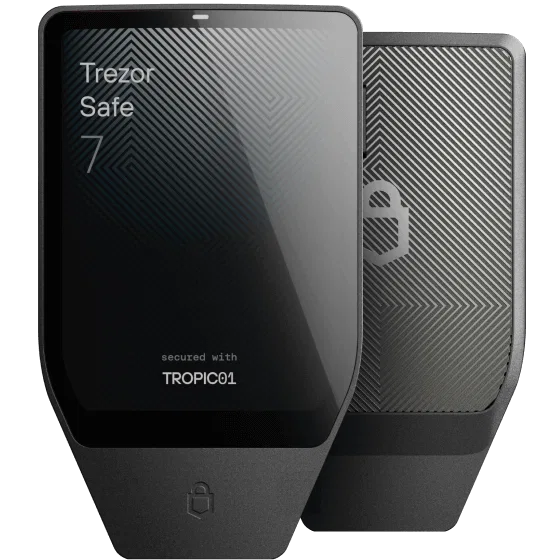
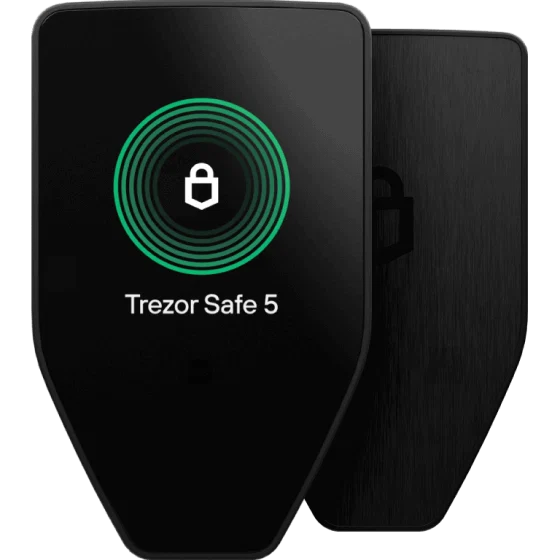
Both methods derive the same wallet when the backup and passphrase match.
Passphrase strength and separate storage
Someone with a usable wallet backup can try passphrase guesses to derive the hidden wallet's spending keys. An attacker can test guesses away from your device, so the device's PIN retry limit doesn't constrain that search. Randomly selected words or cryptographically generated characters enlarge the space of possible inputs. Familiar quotations, personal dates, and predictable substitutions give an attacker narrower guesses, even when the resulting text looks complicated. Length helps only when the way you choose the characters adds unpredictability. Anyone who obtains both secrets can reconstruct the wallet without the original device.
A written passphrase stored separately from the wallet backup reduces the chance one discovery exposes both secrets. It also adds a record you must protect from loss and damage. Neither the Trezor device nor Suite keeps a recoverable saved copy for you. A temporary firmware session can hold derived wallet material, but it doesn't provide a passphrase recovery service. Emergency access arrangements need to preserve both the backup and the exact text.
Fund transfers when changing passphrases
Keeping your funds under a different passphrase requires an on-chain transfer to the wallet that passphrase derives. You can't edit the original wallet's passphrase as if it were an account password. Transfers require the applicable network fee, and enabling the feature alone moves nothing. The original wallet remains accessible with its original passphrase and backup. Turning off the passphrase feature doesn't rewrite the keys or balances of an existing hidden wallet.
BIP39 and SLIP39 derive wallet secrets differently
BIP39 and SLIP39 both support passphrase-protected wallets, although the passphrase enters their underlying mechanisms differently. BIP39 uses PBKDF2, a password-based key-derivation function, to combine the recovery words and passphrase into a wallet seed. An empty passphrase gives the standard wallet. A custom secret changes that seed without changing the recovery words you've already backed up.
With SLIP39, enough recovery shares reconstruct an encrypted master secret. The passphrase decrypts that material into the secret used for wallet derivation. A different passphrase still produces usable secret material, so successful derivation doesn't certify the intended wallet. The required share threshold and the passphrase serve distinct purposes: sufficient shares reconstruct backup material, while the passphrase determines which wallet it opens.
Recovery with matching secrets and a compatible backup format
Recovering a passphrase wallet requires a matching wallet backup and the exact passphrase. A replacement device also has to support the backup format. For a SLIP39 backup, recovery requires valid shares meeting its configured thresholds. A passphrase doesn't compensate for missing recovery material.
Device loss, a reset, or a failed firmware update erasing device memory doesn't change these requirements. A successful backup check verifies the backup against device storage; it doesn't prove you've recorded the passphrase correctly. Conversely, an address check establishes repeatable access with the loaded backup without simulating recovery onto a replacement device.
If the exact passphrase becomes unavailable, support can't reset it. Your standard wallet and other passphrase wallets remain separate; access to one doesn't recover another.
Trezor passphrase: frequently asked questions
What does the 'passphrase mismatch' message mean?
The mismatch message means the confirmation entry differed from the first passphrase entry. It appears during the new-wallet confirmation flow, before the wallet opens. It doesn't identify which entry you intended to keep. Enter the same text from your written record at both prompts.
Why does Suite say my passphrase is incorrect when signing?
Suite can reject a signing request when the entered passphrase doesn't reproduce the wallet selected in the app. Every permitted string can derive a wallet, but the selected wallet's keys must match the transaction being authorized. This error differs from opening a new, empty wallet and from a mismatch between confirmation entries.
Which characters are accepted in a Trezor passphrase?
Trezor Suite accepts up to 50 printable ASCII characters, including letters, digits, spaces, and punctuation. Letters are case-sensitive, and spaces count toward the limit. This cap describes Suite's input support; it doesn't define the limits of every application implementing a passphrase standard.
Does knowing my passphrase alone let someone spend from the hidden wallet?
The passphrase alone doesn't supply the underlying wallet secret needed to derive spending keys. Access also requires that secret, either reconstructed from a backup or already present on an initialized Trezor. Someone who can operate your unlocked device may therefore need no separate written backup. Protecting the paper backup doesn't make a disclosed passphrase harmless.
When does opening a hidden wallet create a network fee?
Deriving or reopening the wallet doesn't itself create a blockchain transaction or a network fee. A fee arises when funds move between addresses on a network charging transaction fees, including a transfer between standard and hidden wallets.
Can a hidden wallet receive funds while the standard wallet is empty?
A hidden wallet can receive funds directly at its own addresses without funding the standard wallet. Their balances belong to separate derived wallets. There's no required transfer through the standard wallet. Receipt at an address doesn't establish that your written passphrase can reopen the account.